


A client portal for people going through a hard time.
Clients see where they stand, send what you've asked for, sign and pay from their phone, in your company's look. Everything they send lands on their case.
A recording of Debtly's client portal for Wattle Debt Administration. Sofia Allen signs in with her mobile number and a six-digit code, with no password. Her home page shows debt agreement DA3302 38% paid: $9,486.72 of $24,507.36, the next contribution of $395.28 on Thursday 26 November by direct debit, one on its way, on track to finish in April 2028, and a to-do to send her documents. She scrolls her contributions, then replies to her case manager Mei that her shifts have been cut. She sends this week's payslip as proof of income, and it appears in her documents. Last, she asks to change her payments: pay less, $320 fortnightly from 26 November, because her income dropped, and the request shows as sent.
What happens after they tap send.
Reads what they upload
Payslips, bank statements and Centrelink letters read as they arrive, with figures proposed and account numbers masked.
Changes noted for you
When a client returns their information form, Luna proposes a note on what changed and a task to review it.
Chases what's missing
Document requests remind the client until everything's in, and stop the moment it is.
Ask once. Get everything.
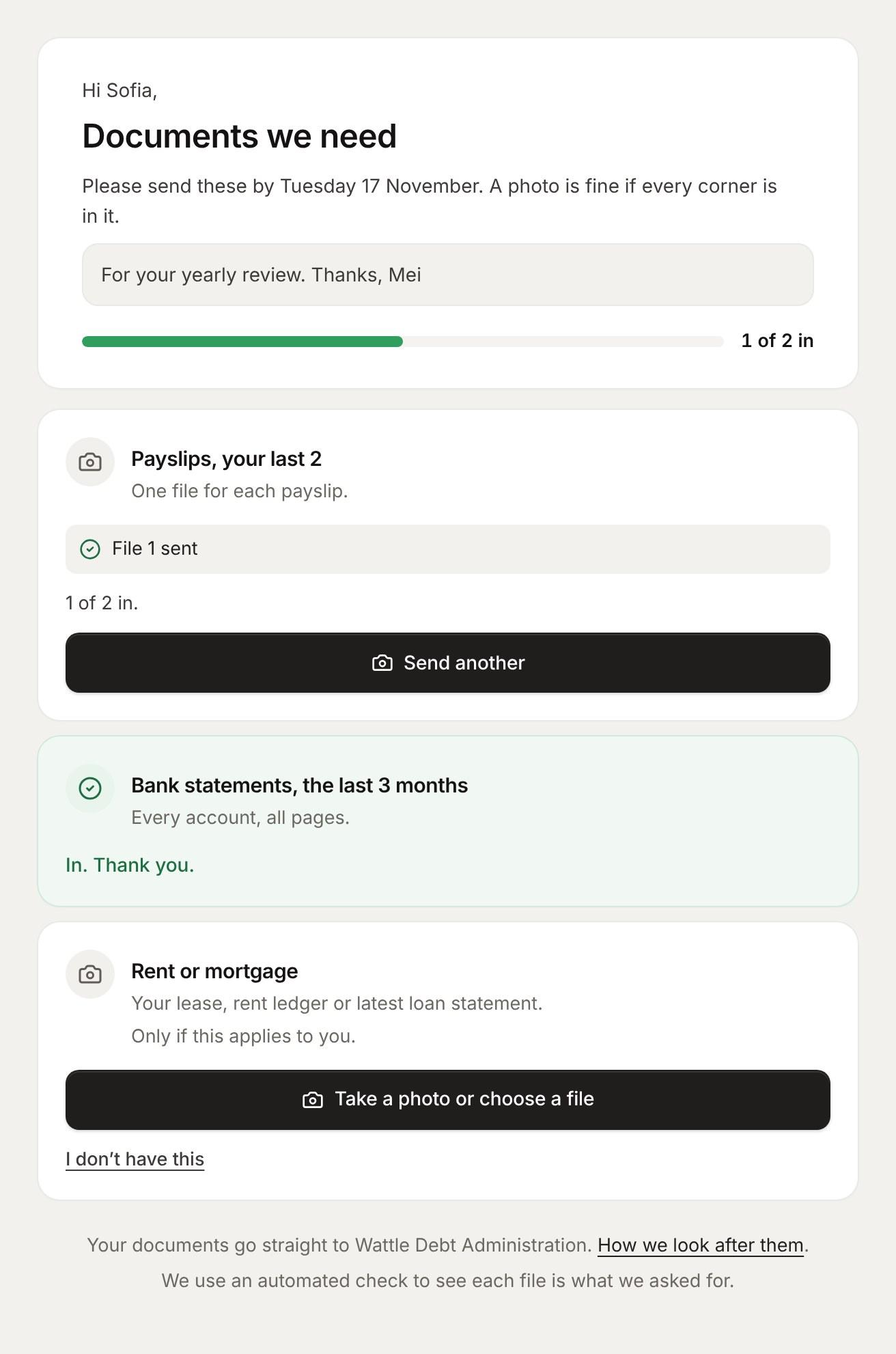
Pick what you need, and Debtly sends one link by SMS and email. The client adds each item from their phone, reminders go out until it's all in, and every file is checked and filed on the case.
- Payslips, bank statements, photo ID, Centrelink and one slot per creditor
- Clients can say they don't have an item, and why, so nobody chases it forever
- Saved requests for the sets you ask for every week

Everything they need, on the phone in their hand.
Clients see where they stand, send what you've asked for, sign and pay. No password to forget.
Start to finish, in three steps.
- 1
You ask once
Request documents, a form or a signature from the case.
- 2
They do it from their phone
Signed in with a six-digit code: uploads, forms, signing and pay now, all in one place.
- 3
It lands on the case
Files are filed, money is receipted and requests reach the case manager.
Caught up in a minute
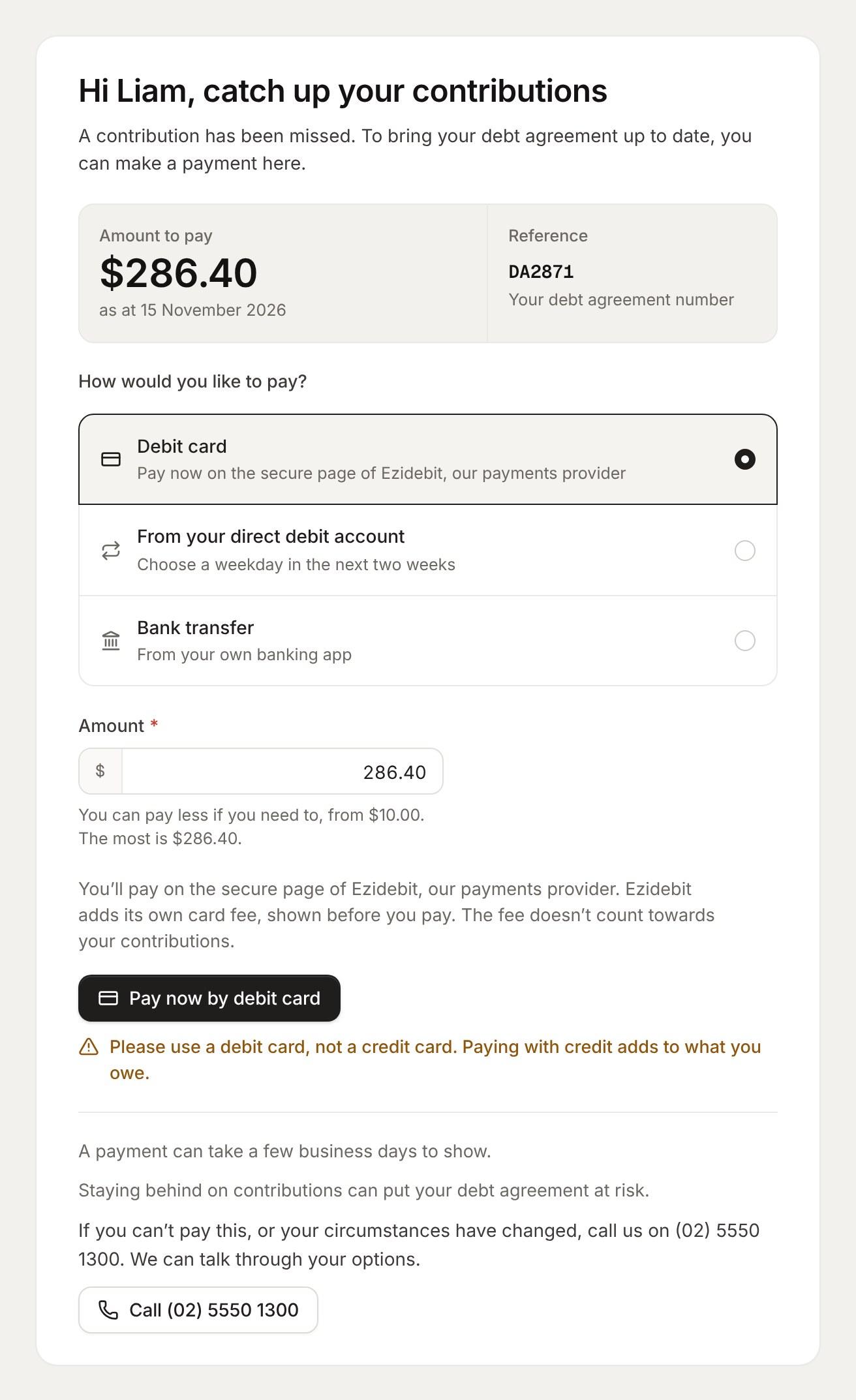
Send a pay now link from the case by SMS or email. The client sees exactly what they're behind on, pays the way that suits them, and the money lands as a receipt on their case.
- Debit card, a one-off direct debit or bank transfer to trust
- One open link a case, reused if you send it again
- Switched on per operating company
Everything in client portal.
Their own portal
Progress, the next contribution, documents, requests and messages. It installs on a phone like an app.
No passwords to forget
A six-digit code by email or SMS, plus their date of birth the first time.
Requests
“Change my payments” and “I can't make a payment” go straight to the case manager's inbox.
Document requests
Ask for payslips, bank statements, ID and creditor statements in one link, with reminders until it's done.
Uploads checked as they land
Each file is checked against what was asked for, then filed on the case.
Client forms
The client information form, plus up to 20 forms of your own, reviewed before anything is applied.
E-signing
Documents signed online, and the signed copies filed on the case.
Pay now
Debit card, a one-off direct debit or bank transfer, receipted to the right case.
Direct debit sign-up
Clients set up their own direct debit from a link. No paper form.
Manage a booking
Clients move or cancel their appointment themselves.
In your company's look
Every client page wears the operating company's website theme, with its footer locked.
Access you control
Lock, revoke or restore a client's access, and sign them out on every device at once.
What people ask.
Do clients need a password?
No. They sign in with a six-digit code sent to their phone or email.
Does it look like our company?
Yes. Every client page wears the operating company's website theme, with its footer locked.
Can clients set up their own direct debit?
Yes, from a link. No paper form.
One system, not ten.
Every area shares one database, one set of roles and one audit log.
See Debtly with your own cases.
A walkthrough of Debtly, run the way your office works today. Bring your hardest case.