


Every conversation answered, on the right case.
Email, SMS, live chat, website forms and portal messages land in one inbox, matched to the right lead, case or creditor. When your team can't pick up, live chat and the AI voice agent do, and the voice agent calls people back.
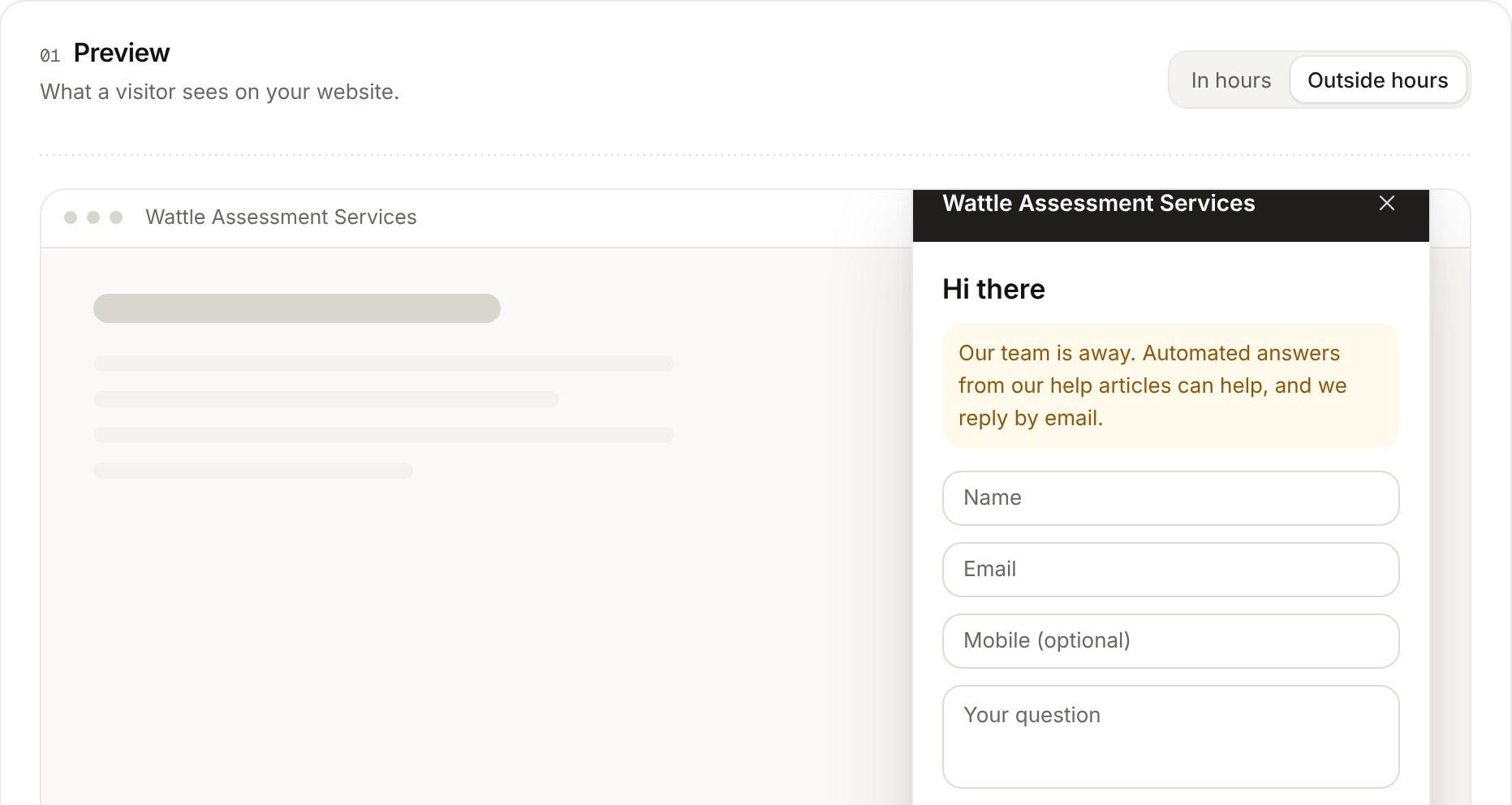
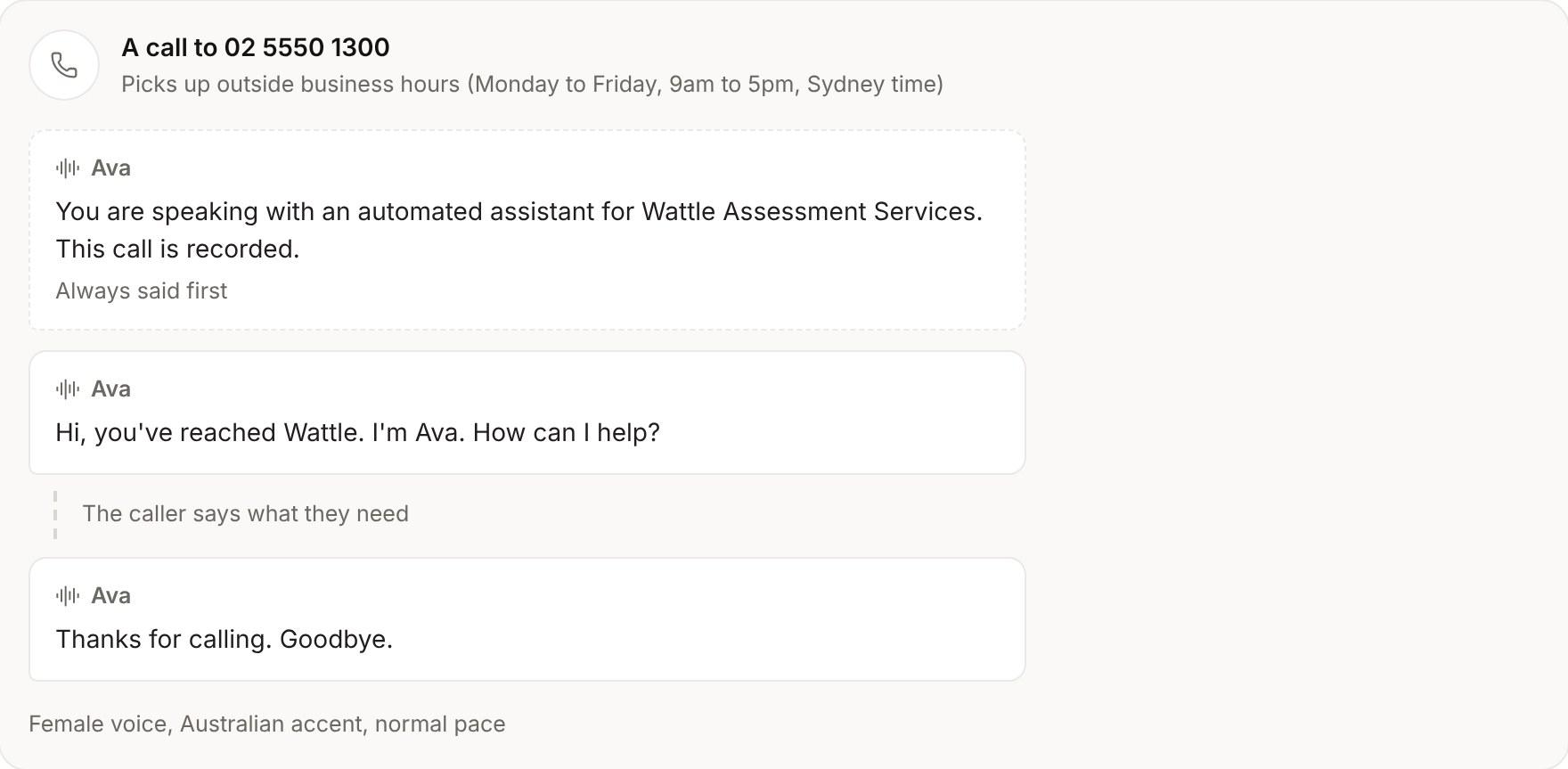
A recording of Debtly's support inbox and channels. Darius Silva's text, “Lost my job last week, what are my options?”, opens with his debt agreement DA3308 beside it: case manager Mei Chen, $338.38 in arrears. Luna drafts a reply from a short instruction, saying Mei will call tomorrow to talk through his options, and it goes by SMS. Live chat is set to answer from help centre articles outside business hours, and its preview shows visitors that automated answers can help. The voice agent's greeting is changed to “Hi, you've reached Wattle. I'm Ava. How can I help?”, and the call preview shows what a caller hears.
Agents on the front desk.
Answers and makes calls
Its own name, voice and greeting. It answers from your help centre, takes messages, puts callers through and calls people back.
Covers out of hours
Answers from your help articles when the team is away, and hands over hardship and complaints to a person.
Drafts the reply
An email or SMS for the record you're on, in plain English. You read it and you send it.
A chat that knows when to hand over
In business hours, your team answers. After hours, chat answers from your published help articles, labelled as automated, and hands straight to a person at any mention of hardship, distress, a complaint or legal action.
- Answers only from your own public articles, never from a client's record
- At most five automated answers in a chat
- Unmatched visitors become a lead in one click

Someone always picks up.
The voice agent answers when your team can't and calls people back, live chat covers the evenings, and every conversation lands on the right case.
Start to finish, in three steps.
- 1
A client gets in touch
By phone, email, SMS, live chat, a website form or the portal.
- 2
It lands on their case
Matched to the right lead, case or creditor, with a response target and an owner.
- 3
Someone answers
With a saved reply, a Luna draft or a call back, inside the client's contact hours.
A voice that answers, and calls back
Give the voice agent a name, a voice and a greeting. Choose whether it takes every call or only out of hours, and who it calls back.
- Answers general questions from your help centre
- Takes a message, or puts the caller through to a person
- Calls new leads back and reminds clients of their appointments
- Calls can be recorded, and callers are told when they are
Everything in support.
One inbox
Email, SMS, live chat, website forms and client portal messages, each filed on the right lead, case or creditor.
Live chat
A chat bubble on your sites, in your colours, with the page each visitor is on beside the chat.
AI voice agent
Answers your phone in its own name and voice, takes messages, puts callers through, and calls new leads and clients back.
Covered out of hours
After hours, chat answers from your published help articles, and anyone who emails or texts gets your acknowledgement.
Help centre
Articles in categories, public at /help, and one click to put any article into a reply.
Saved replies
Yours or the team's, with merge fields filled from the record you're replying on.
Notes, mentions and tags
Discuss a conversation without the client seeing, @mention a colleague, tag it and set its priority.
Response targets
First and next response targets in business hours, so whoever has waited longest is never missed.
No double replies
Before you send, see who else is reading or replying, and what's arrived since you started.
Contact hours and limits
Texts wait for contact hours where the client lives, and you see how often they've heard from you.
Complaints
Raise a complaint from the conversation, track it to its resolution and reopen it if it comes back.
Inbox reports
Conversations, response times and what's waiting, by channel and by person.
What people ask.
Does the voice agent answer every call?
You choose: every call, or only out of hours. You also decide what it can help with and who it puts callers through to.
Who does the voice agent call?
New leads who asked for a call, and clients with an appointment coming up. It calls only inside your contact hours and the client's contact limits.
What happens with hardship or a complaint?
Live chat hands it to a person. Complaints go on the register with how they were handled and how they ended.
Can two people reply to the same message?
Not by accident. Before you send, Debtly shows who else is reading or replying, and what's arrived since you started.
One system, not ten.
Every area shares one database, one set of roles and one audit log.
See Debtly with your own cases.
A walkthrough of Debtly, run the way your office works today. Bring your hardest case.